
It might seem silly, but I just hate having to see the Slack Connection window every time I start my computer. I just wanted it to start minimized, no big deal!
To start it minimized, just append -u to the command, e.g.
slack -u
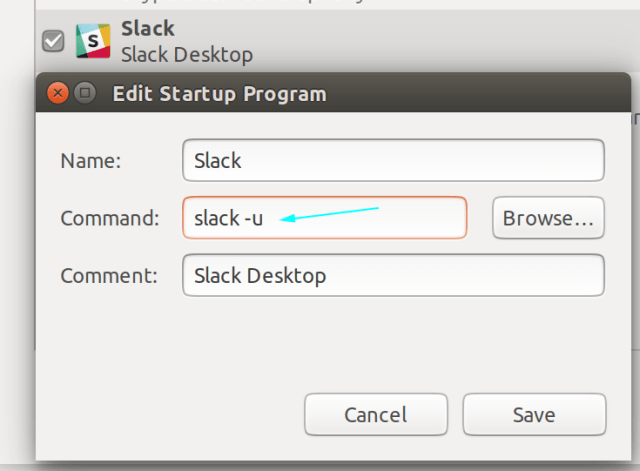
Enjoy!
It might seem silly, but I just hate having to see the Slack Connection window every time I start my computer. I just wanted it to start minimized, no big deal!
To start it minimized, just append -u to the command, e.g.
slack -u
Enjoy!


 Just Some Techie Notes!
OMFG this was driving me crazy. I was trying to do this with Devilspie2 with no luck. Thank you!
LikeLiked by 1 person
My pleasure 😊
LikeLike
If you have Gnome autostart Slack, and slack is installed from flathub, you can get rid of annoyance by changing exec line in ~/.config/autostart/com.slack.Slack.desktop into something like:
Exec=sh -c “/usr/bin/flatpak run –branch=stable –arch=x86_64 –command=slack –file-forwarding com.slack.Slack –startup @@u %U @@ & sleep 12 ; /usr/bin/wmctrl -c slack”
Dependency is a wmctrl package.
This is tested in CentOS 7 with Gnome 3.28, wmctrl from EPEL repo, and slack 3.3.8 from flathub.
It should work with Slack installed from a package with a slightly different exec.
Key is in –startup(equivalent to -u) switch, and giving wmctrl some time with sleep command for slack to initialise. Number can be varied based on a speed of Slack initialisation.
LikeLiked by 1 person
It not only minimizes Slack, but also kills the initial minimized window and leaves Slack happily live in a tray.
LikeLike
any alternative for 19.10?
LikeLike
try
slack %U -u
LikeLike
I don’t know is order important, but I done it with:
slack -u %U
LikeLike
Adding this to Startup Applications still works in Ubuntu 23.10 and much better than the app’s own “Launch on Login” option 🙂
I tried to find this launch flag with slack -h (or –help) but that showed nothing.
Thanks for saving the day!
LikeLiked by 1 person
My pleasure
LikeLike