
Just edit the file ~/.vmware/preferences and add the following line
mks.gl.allowBlacklistedDrivers = “TRUE”
That’s it, enjoy!
Source: http://askubuntu.com/questions/537787/enable-3d-hw-acceleration-on-vmware-workstation-10-on-ubuntu-14-04
Just edit the file ~/.vmware/preferences and add the following line
mks.gl.allowBlacklistedDrivers = “TRUE”
That’s it, enjoy!
Source: http://askubuntu.com/questions/537787/enable-3d-hw-acceleration-on-vmware-workstation-10-on-ubuntu-14-04
We lose USB Flash drives all the time, so if you hold any sensitive or personal stuff, you’d better have it encrypted, just in case.
Important Notes:
Let’s get going then. The steps are pretty simple:


Now, whenever you insert and try to mount your flash drive in any Linux computer, the following dialogue will automatically appear:
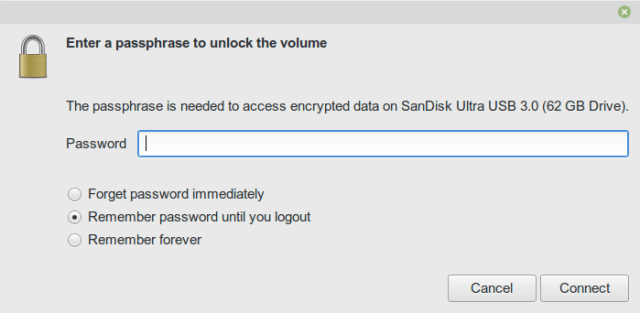
Enter your password and then you will be able to use the flash drive.
Tested on Linux Mint 18.1 (based on Ubuntu 16.04 LTS).
Enjoy!
Found a great script that does an amazing job with compressing PDF files whilst maintaining a good quality:
Get the script from here: http://www.alfredklomp.com/programming/shrinkpdf/
Just copy the script to a text file and make it executable, then run:
./shrinkpdf infile.pdf outfile.pdf
It compressed 3 PDF files from 80 MB to 13 MB!
Enjoy!
Just do the following two steps:
sudo nano /usr/share/applications/google-chrome.desktop
Exec=/usr/bin/google-chrome-stable –disable-gpu-driver-bug-workarounds –enable-native-gpu-memory-buffers %U
That’s it, now restart Chrome and it shall work perfectly!
I am using Google Chrome 54 64-bit on Linux Mint 18 64-bit with the Cinnamon Desktop
Source: https://www.youtube.com/watch?v=Lzawulh5vKo
A problem that has been bugging me for a while on my Linux Mint 18, that the DNS is not working properly and on a random basis.
What I could fix it with is that I just did the following:
sudo vi /etc/NetworkManager/NetworkManager.conf
Then commented out this line:
dns=dnsmasq
That’s it! I don’t remember the source I took it from, but will add it once I remember 😛
Enjoy!


