Install Gnome 3 on Ubuntu Lucid

This is not for production usage, take extreme care! However, Gnome 3 installation will not affect your Gnome 2.* files.

Here are the steps:

  • sudo add-apt-repository ppa:ricotz/testing
  • sudo apt-get update
  • sudo apt-get install gnome-shell
  • gnome-shell –replace
You can use the “Window” key if you have any or click on the “Activity” on the top left corner of the screen to start using it.
To end your test:
Just go to the terminal from which you ran “gnome-shell” and end the command (ctrl+c for example).
Note: A strange behavior occurred with me;  it respawned the gnome-panel for me, although I use Avant Window Navigator instead, no big deal anyway, I just killed the “gnome-panel” (“killall gnome-panel“) and “avant-window-navigator” (“killall avant-window-navigator“) and respawned the latter: “nohup avant-window-navigator &“, everything is back to normal now, I’ll keep you posted if I encounter anything new.
Quick Review:
Pros: Visually stunning, and I could easily reach any application or document I needed
Cons: Very buggy and still needs a lot of performance enhancement,well it’s an early beta, what would you expect?
Posted in Gnome 3, gnome-shell | Tagged , , , , | 2 Comments

At last, permanent solution to the problem of Ubuntu Lucid Network Manager – sometimes – not able to recognize 3G modem

At last, and after a long wait and suffering each time I need to use my 3G modem (plug in, plug out, use another USB port, switch two modems …etc), and the worst was that I didn’t know why it wasn’t getting recognized by the network-manager SOMETIMES!

The solution is simply installing the “usb-modeswitch” package; “sudo apt-get install usb-modeswitch“, as indicated in the following bug report, I totally agree with the bug author that the “usb-modeswitch” package should automatically be installed with the network-manager.

Note: I don’t know whether you just need to restart the network manager “sudo restart network-manager”, kill the nm-applet “killall nm-applet” and then reopen it “nohup nm-applet &”, or even restart the whole OS for this to work immediately, you can simply restart the OS, this will definitely make it work :), I’d love to read your comments and what you experienced

Tagged , , , , , , , , , | Leave a comment

Buddy Pounce in Pidgin

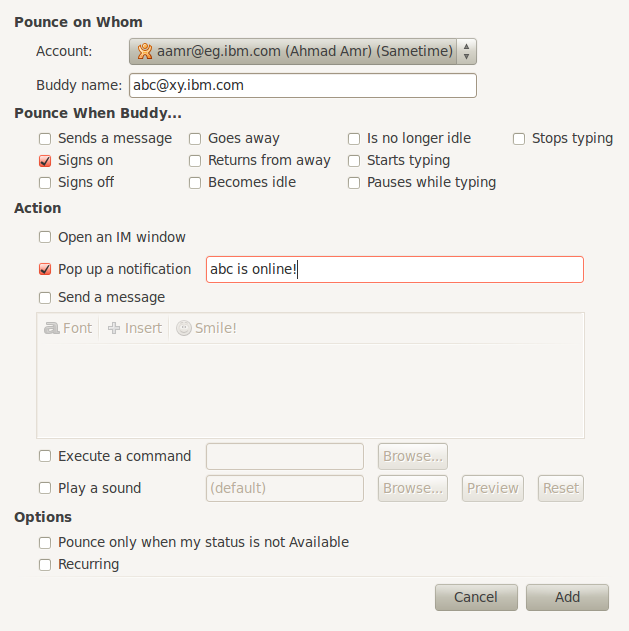
A very nice feature that allows triggering of events based on buddies’ actions, here is a sample scenario:

  • I’ve logged in to Sametime and found my manager offline
  • Right-click on the name and click “Add Buddy Pounce”
  • I needed to be notified by a pop-up notification once my manager – abc here – went online, so I ticked “Signs on” and “Pop up a notification” and then entered the text I wanted to appear in the pop up “abc is online!”
  • Clicked “Add”

To view the buddy pounces list, click Tools -> Buddy Pounces, you can add/modify/delete pounces from there, very useful, isn’t it 🙂 ?

Enjoy!

Posted in Uncategorized | Tagged , , | 2 Comments

Instant Delivery of New Blog Posts & Comments On WordPress Via Jabber

Want Instant Delivery of New Blog Posts & Comments?

Posted in Uncategorized | Tagged , , | Leave a comment

Clear Saved Username/Password for a specific site on Firefox

I had a wrong password saved for my Gmail inbox and Firefox (V3.5.8 at the time of this post) didn’t want to change it, so I have to change the saved password each time I open my inbox, so I did the following:

Click on Edit -> Preferences -> Security -> Saved Passwords
Searched for “Gmail”
Clicked “Remove”

That’s it, pretty simple

Posted in Uncategorized | Tagged | Leave a comment