Working with KSH

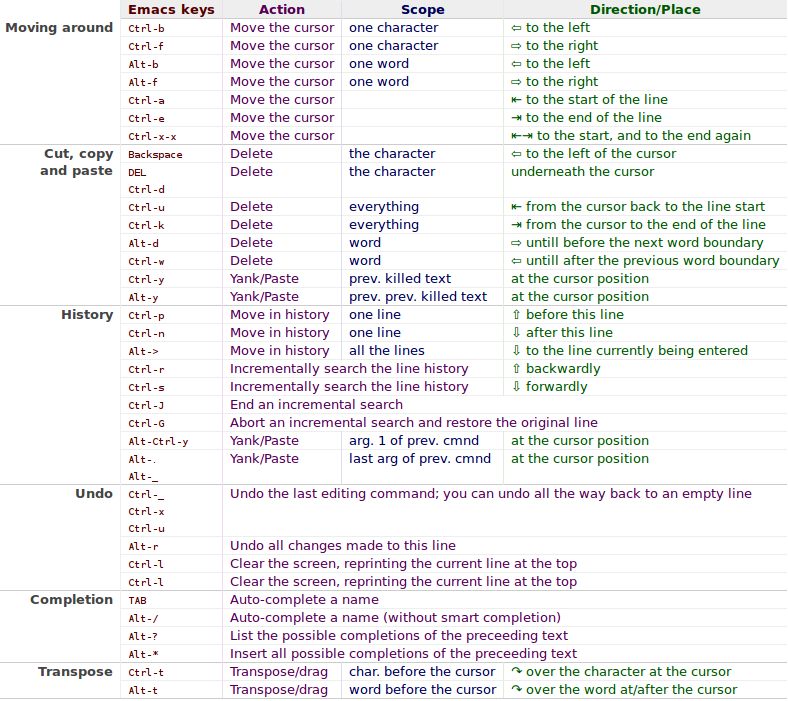
Here are the shortcuts that were of utmost importance to get me productive with KSH:

“stty erase ^?” to remove the ‘^?’ symbol when the backspace key is pressed.

“Ctrl-p” shows the previous command that you typed, pressing several time will get you sequentially to older commands

“Ctrl-n” shows the next command in case you used “Ctrl-p”, i.e. navigates forward

“Ctrl-b” moves the cursor back one character

“Ctrl-f” moves the cursor forward one character

Here is a screenshot of a table that contains most of the shortcuts

Note: Not all of them work, like the reverse search, have no idea why yet.

Source: http://www.bigsmoke.us/readline/shortcuts

Posted in Unix | Tagged , , , | Leave a comment

How to stop mysql from starting up automatically in Ubuntu Desktop

MySQL uses a different mechanism other than apache2, so you can simply comment the three lines inside “/etc/init/mysql.conf”

Change this:

start on (net-device-up
and local-filesystems
and runlevel [2345])
stop on runlevel [016]

to this:

#start on (net-device-up
# and local-filesystems
# and runlevel [2345])
stop on runlevel [016]

Source: http://anonir.wordpress.com/2010/08/09/ubuntu-lucid-disable-services-from-starting-during-boot/

It worked perfectly with the latest version of Ubuntu as of this article (Oneiric, 11.10)

Posted in Ubuntu | Tagged , , , , , | Leave a comment

How to stop apache2 from automatically starting in Ubuntu Desktop

sudo update-rc.d apache2 remove

Posted in Ubuntu | Tagged , , , | Leave a comment

How to exclude a folder when using TAR to archive

I’m generally using the “tar” utility to backup my stuff, but sometimes I need to exclude some folders, especially very large folders such as those for Videos or Virtual Machines, this is the syntax you need to use:

tar -cvf /media/L_AAMR/slash_home_before_Oneric_25_Oct_2011.tar /home/aamr –exclude=VirtualBox\ VMs/

In the above example, I tarred all the contents of my home folder “/home/aamr” onto a TAR file inside my external HDD: “/media/L_AAMR/slash_home_before_Oneric_25_Oct_2011.tar” excluding the Virtual Machines folder “VirtualBox\ VMs/”, I used the relative path here as I was standing on “/home/aamr”.

Update: For some reason the folder with spaces “VirtualBox\ VMS/” didn’t work out, so I used a wildcard instead “Virtualbox*” and it ran correctly.

Posted in Ubuntu | Tagged , | Leave a comment

Enable/Disable registration of LibreOffice as default app for opening office files on Windows

First post after a long time!

Registration of LibreOffice as default application for Microsoft Office formats can be forced or suppressed by using the following command line switches with the installer:

  • /msoreg=1 will force registration of LibreOffice as default application for Microsoft Office formats;
  • /msoreg=0 will suppress registration of LibreOffice as default application for Microsoft Office formats.

Source: http://www.libreoffice.org/get-help/system-requirements/

Posted in Windows | Tagged , , , , , | Leave a comment